 Every Voice
Add closed captions to a YouTube live stream
Send captions straight to YouTube, so viewers can turn them on with the CC button.
Set up your stream on YouTube
Open Live Control Room in YouTube Studio. In your stream's settings, set the latency to Normal and add a 30 or 60 second delay. YouTube needs that delay to line captions up with the video, and ultra-low latency doesn't support captions at all.
Turn on captions and copy the URL
Turn on Closed captions and choose Post captions to URL. Copy the caption URL that YouTube shows you.
Paste it into the studio
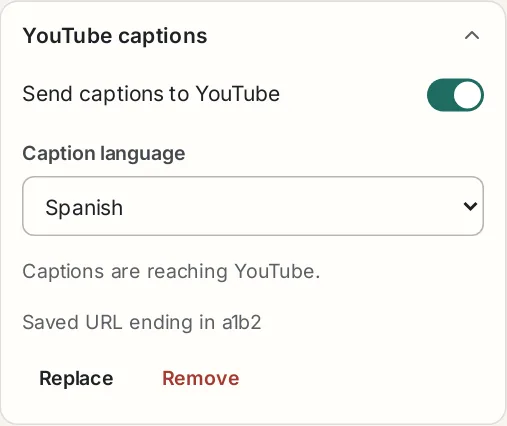
On the Live page, open YouTube captions. Paste the URL and press Save. You only have to do this once, unless YouTube gives you a new URL.
With several campuses, each campus streams on its own, so each has its own caption URL. Choose the campus at the top of the Live page first, then paste that campus's URL.
Choose the language
Pick Original for the language being spoken, or one of the translation languages in your session. You can change it while you're live.
YouTube takes one caption language per stream. For anyone who wants another language, put your Every Voice link or QR code in the video description.
Go live on YouTube, then start your session
Start your stream in OBS or your encoder and make sure it's live on YouTube. Then press Start session in the studio. YouTube won't accept captions until the stream is running.
Check it on YouTube
The panel should say Captions are reaching YouTube. Open your stream on another device and press the CC button. Viewers will be at least as far behind the room as the delay you chose.
If captions don't appear
| What you see | What to do |
|---|---|
| YouTube isn't accepting captions | Check that your stream is live. If it is, copy the caption URL again from YouTube and press Replace in the panel. |
| That language isn't part of this session | Add that language to your session, or choose another one for YouTube. |
| Waiting for the first line | Nobody has finished a sentence yet. Say something. |
Captions in the wrong place in the video? Make sure YouTube's delay is on and the latency is set to Normal.